This edition reproduces the explanatory and defensive sections of the original article. The step-by-step attack demonstration is omitted.
Active Directory remains the most important and targeted component in the IT infrastructure of organizations. Yet, the mechanics of how it functions are often misunderstood. This article explores Tombstones, a technical concept that is frequently overlooked, and examines their impact on security.
In Active Directory Domain Services (AD DS), a Tombstone represents a deleted object that has been logically removed but physically retained within the directory database (NTDS.dit). Tombstones are generated automatically whenever an object is deleted, whether through manual administrative action, automated cleanup scripts, or configuration errors.
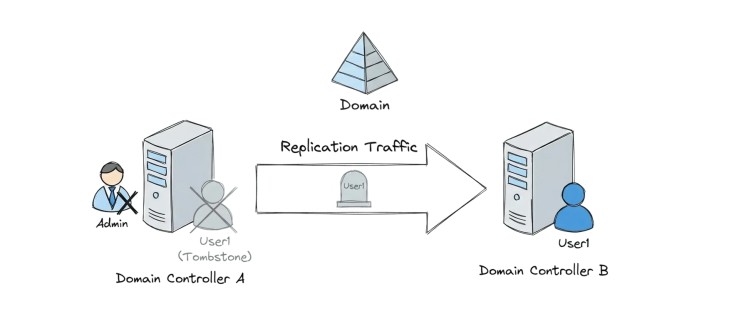
Because Active Directory is a distributed system involving multiple Domain Controllers (DCs), deletions cannot occur instantaneously across the entire network.
If an object were simply erased from one DC's database, other DCs would not know to delete their copies during the next replication cycle. To solve this, AD converts the deleted object into a tombstone which is a marker that signals to all other DCs that the object has been removed.
While tombstones serve an important function for directory consistency and replication, they also function as a "soft delete." Until the tombstone is purged by the system, the object remains recoverable, creating a potential attack surface for persistence and privilege escalation.
AD Object Identity
To understand the security implications of object deletion and restoration, one must first understand how Active Directory identifies and authorizes objects.
Active Directory functions as an object-oriented database. Every resource (User, Group, Computer) is an instance of a class defined in the AD Schema. While objects possess human-readable attributes like Distinguished Name (DN) or Common Name (CN), these are mutable and can change if an object is renamed or moved.
For system operations, AD relies on immutable identifiers: Object GUID (Globally Unique Identifier) and Security Identifier (SID).
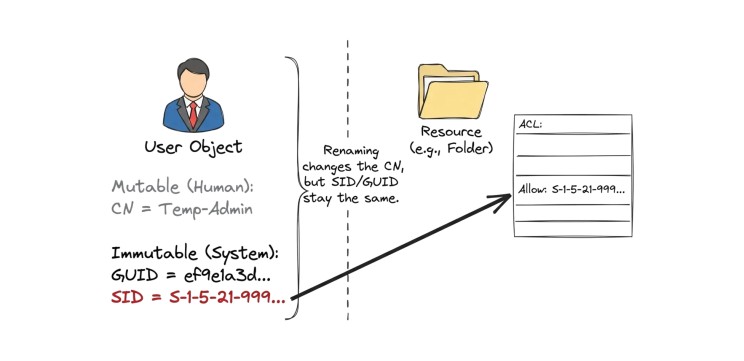
Windows authorization relies exclusively on the SID, not the username. When a user is added to a group (e.g., Domain Admins) or granted permissions via an Access Control List (ACL), the reference is stored as the object's SID.
If a security principal is deleted and subsequently restored (reanimated) with its original SID intact, it immediately regains all prior access rights, group memberships, and privileges.
Tombstone Lifecycle
The transformation from an active object to a purged record follows a strict lifecycle governed by the Directory Service.
When an administrator deletes an object, Active Directory does not immediately destroy it. Instead, the isDeleted attribute is set to TRUE and the object is moved to the hidden CN=Deleted Objects container. During this transition, most non-essential attributes are stripped to conserve database space, but critical identifiers like the GUID and SID are preserved. Simultaneously, the Relative Distinguished Name (RDN) is modified to ensure uniqueness within the flat Deleted Objects container.
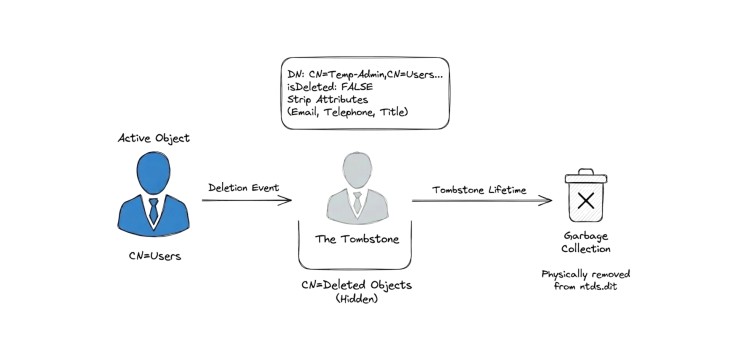
The object persists in this state for the duration of the Tombstone Lifetime (180 days for modern forests, 60 days for legacy forests). Once the TSL expires, the Garbage Collection process runs on each DC to physically remove the tombstone from the database. Until that expiration occurs, the object remains technically recoverable.
Defense and Mitigation
Defending against tombstone abuse requires more than just policy. It requires technical controls that break the attack chain. We focus on auditing permissions, actual object deletion, and detection mechanisms.
Finding the Vulnerability
The attack relies on the Reanimate Tombstones extended right. Attackers often find this delegated to service accounts, Helpdesk roles, or Backup Operators.
Audit permissions using dsacls to identify non-admin accounts with this capability on the Domain Head.
$DomainDN = (Get-ADDomain).DistinguishedName
dsacls $DomainDN | findstr /C:"Reanimate Tombstones"

If you see any group other than Domain Admins or Enterprise Admins (or a specific backup service account) in this list, remove the permission immediately using Active Directory Users and Computers (Advanced Features > Domain Properties > Security).
Secure Offboarding
The Tombstone attack works because the deleted object carries its SIDs with it. If you strip the object before deletion, reanimation becomes useless.
function Remove-ADUserSecurely {
    param ( [string]$TargetUser )
    $User = Get-ADUser $TargetUser -Properties MemberOf
    # 1. Strip all Group Memberships (removing the privileges)
    $User.MemberOf | ForEach-Object {
        Remove-ADGroupMember -Identity $_ -Members $User -Confirm:$false
        Write-Host "Removed from group: $_" -ForegroundColor Green
    }
    # 2. Reset the Password to a random 64-char string (preventing auth if restored)
    Set-ADAccountPassword -Identity $User -NewPassword (ConvertTo-SecureString -String ( -join ((33..126) | Get-Random -Count 64 | % {[char]$_})) -AsPlainText -Force)
    # 3. Delete the account
    Remove-ADUser -Identity $User -Confirm:$false
    Write-Host "User $TargetUser has been sanitized and deleted."
}
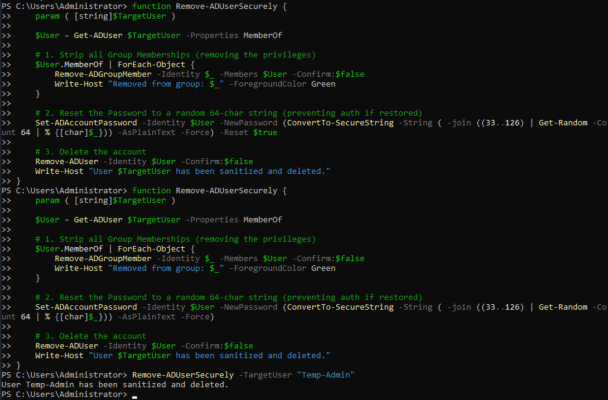
If an attacker restores a user processed by this script, they receive a standard user with no group memberships and an unknown password.
Detection
Detecting tombstone reanimation attempts in SOC can be accomplished by monitoring for Event ID 4662 (An operation was performed on an object) with the specific Access Mask for 'Reanimate Tombstones', or Event ID 5136 (Object Modified).
The following XML query filters for reanimation events performed by non-system accounts:
<QueryList>
  <Query Id="0" Path="Security">
    <Select Path="Security">
      *[System[(EventID=4662)]]
      and
      *[EventData[Data[@Name='SubjectUserName'] != 'SYSTEM']]
      and
      *[EventData[Data[@Name='SubjectUserName'] != 'Administrator']]
    </Select>
  </Query>
</QueryList>
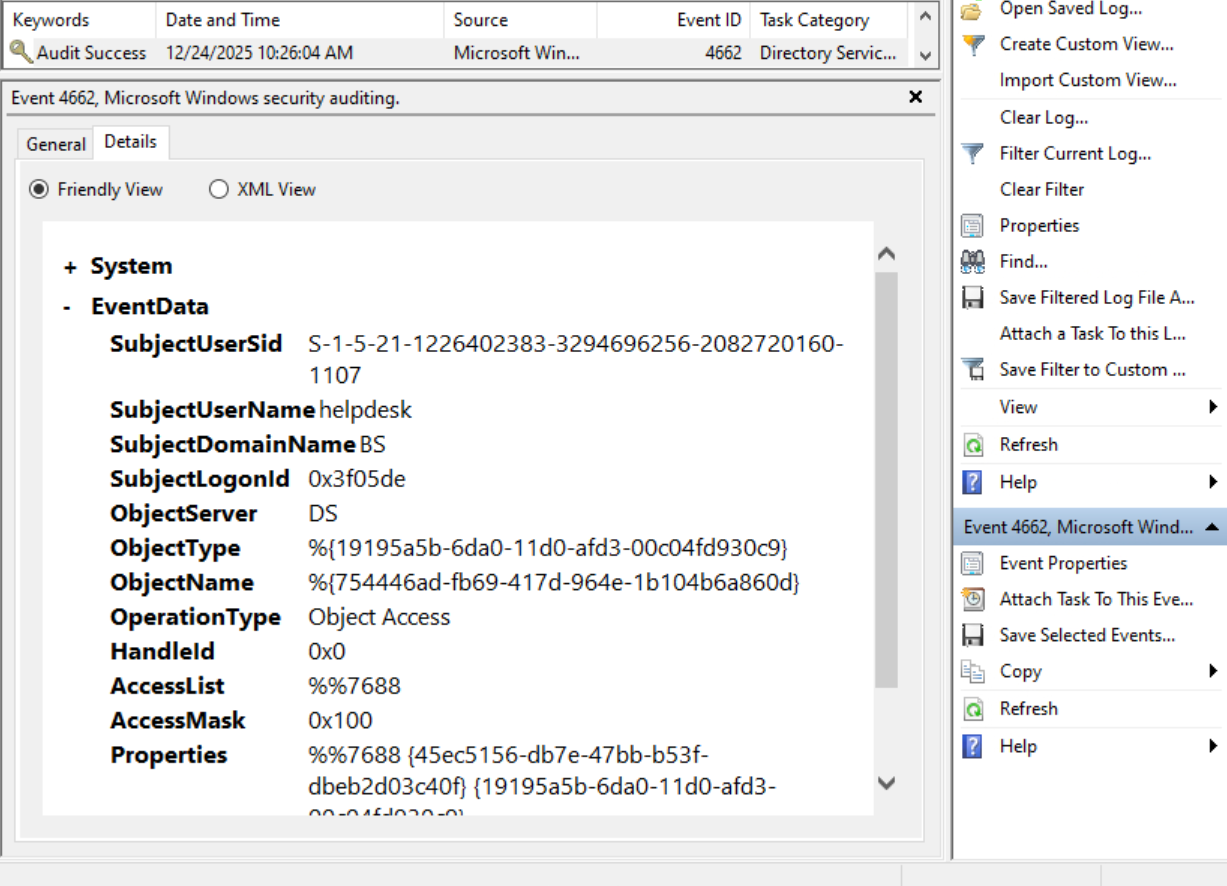
By implementing these auditing, prevention, and detection strategies, we can significantly reduce the risk of tombstone reanimation attacks in Active Directory environments.
Originally published in SecDojo Insights on LinkedIn.
View original publication